Deployment Overview
Unified quickstart:
docs/DEPLOY_QUICKSTART.md—scripts/deploy/install.shfor pilot, EKS, AKS, GKE, Snowflake, and read-only cloud connect.
Use this page when the question is not "how do I install agent-bom?" but
"what should I deploy first, what does that give me, and when do I add runtime
enforcement?"
Treat this as the primary deployment chooser and the canonical deployment decision matrix. The rest of the deployment docs either deepen one of these supported paths or act as reference material for teams intentionally diverging from them.
Decision in one line
| Situation | Deploy | Get |
|---|---|---|
| Laptop scan | pip install agent-bom |
local findings, SBOM, SARIF, HTML, graph export |
| Team demo | docker compose pilot |
shared API + UI control plane on one workstation |
| Production | Helm / EKS Terraform | tenant-aware self-hosted control plane in your cluster |
| Private customer / CISO instance | docker compose platform + product overlay |
login-gated single host, no demo data, real cloud connected read-only |
| Snowflake shop | SPCS / Native App | warehouse-native governance lane in your account |
Same one-liner in prose: laptop scan → pip; team demo → docker compose pilot; production → Helm / EKS Terraform; Snowflake shop → SPCS / Native App. Every lane here runs in your own boundary. Cost posture: all in-repo lanes are free and no managed public SaaS ships in this repo yet; see Product boundaries for the full lane matrix.
For the private, login-gated single-host instance where a real cloud account is connected read-only (the customer / CISO experience, distinct from the public anonymous demo), follow Hosted Authenticated Instance + Connect Your Cloud.
agent-bom is one product with two deployable images:
agentbom/agent-bomfor scanner, API, jobs, gateway, proxy, and other non-browser runtimesagentbom/agent-bom-uifor the browser dashboard
Pilot on one workstation:
scripts/deploy/install.sh pilot
# or without a checkout:
curl -fsSL https://raw.githubusercontent.com/msaad00/agent-bom/main/deploy/docker-compose.pilot.yml -o docker-compose.pilot.yml
docker compose -f docker-compose.pilot.yml up -d
# Dashboard -> http://localhost:3000
Production in your own cluster from a checked-out repo:
export AWS_REGION="<your-aws-region>"
cp deploy/terraform/platform-eks/terraform.tfvars.example \
  deploy/terraform/platform-eks/terraform.tfvars
# Configure staged prerequisites and secret names, then:
scripts/deploy/install.sh eks
Advanced/manual chart install from a checked-out repo requires the four pre-created role-separated Secrets documented in Control Plane Helm:
helm upgrade --install agent-bom deploy/helm/agent-bom \
  --namespace agent-bom --create-namespace \
  -f deploy/helm/agent-bom/examples/eks-production-values.yaml
Read This Way
Do not read every deployment page. Pick one path, then open reference pages only when your platform team needs that specific detail.
| You are trying to... | Start with | Stop there unless... |
|---|---|---|
| run a local pilot | Docker | you need EKS, SSO, or fleet sync |
| deploy in vanilla EKS | Vanilla EKS Quickstart | you need service mesh, ESO, or cert-manager |
| deploy in hardened AWS / EKS | Your Own AWS / EKS | you need a lower-level Helm or Terraform reference |
| run a Snowflake POV | Snowflake POV | you need backend-parity details |
| choose proxy vs gateway vs fleet | Proxy vs Gateway vs Fleet | you need runtime operations or gateway discovery |
Everything else in the deployment section is reference material.
Product Surfaces
| Surface | Deploy when | What it gives you |
|---|---|---|
| Scan | day 1 | discovery, package/image/IaC/cloud checks, findings, blast radius |
| Fleet | day 1 for teams | endpoint and collector inventory without inline traffic control |
| API + UI | self-hosted pilots and production | auth, RBAC, tenant scope, graph, remediation, audit, policy |
| Proxy | selected local or sidecar MCPs | inline local MCP inspection, policy decisions, signed audit events |
| Gateway | shared remote MCP traffic | central remote MCP relay, policy distribution, audit events |
| MCP server mode | agent-invoked scanning | exposes agent-bom as read-mostly MCP tools, resources, and prompts |
Default rollout: deploy API + UI with Postgres, add scans and fleet sync, then add proxy or gateway only where runtime enforcement is worth the extra operating surface.
Deployment Defaults
| Decision | Default |
|---|---|
| first pilot | deploy/docker-compose.pilot.yml |
| production installer | scripts/deploy/install.sh eks + deploy/terraform/platform-eks |
| system of record | Postgres |
| analytics/lake | optional ClickHouse, Snowflake, OTEL, or S3 exports |
| runtime enforcement | selected proxy or gateway, not all traffic by default |
Enterprise Deployment Promise
This self-hosted shape is designed around a few explicit operating principles:
- Customer-controlled hosting: no mandatory vendor control plane and no mandatory SaaS dependency
- Zero-trust access: OIDC, SAML, API keys, RBAC, tenant propagation, quotas, and signed audit trails
- Least privilege: read-only discovery roles where possible, selected proxy enforcement only where needed
- Low latency: runtime inspection stays close to the MCP workloads instead of hairpinning through a global gateway
- Cheap by default: scan workers scale to zero, offline vuln DB reduces repeated network lookups, ClickHouse stays optional
- Interoperable: one shared graph and policy model spans scanner, proxy, gateway, fleet, and API/UI
Self-hosted now, provider track later
The supported strength today is the self-hosted enterprise path:
- one organization running
agent-bomin its own infrastructure - strong tenant-aware auth, RBAC, audit, fleet, graph, and gateway routing
- customer-owned storage, telemetry, and support-sharing decisions
That should not be read as a hidden claim of turnkey MSSP maturity. Provider surfaces such as tenant lifecycle automation, richer delegation templates, and provider-style admin operations remain a separate product track.
Enterprise Self-Hosted Diagrams
Use two readable views. The first explains where each service runs. The second explains how inventory, runtime evidence, and exports move. Each diagram keeps agent-bom in the center and leaves customer-owned systems at the edges.
Every box prefixed with agent-bom is code from this project running in the
customer's environment. Identity, cloud APIs, MCP servers, secret stores, and
analytics destinations stay customer-owned.
Deployment Topology
flowchart LR
    classDef cust fill:#0b1220,stroke:#64748b,color:#e2e8f0,stroke-dasharray:3 3
    classDef ab fill:#0f172a,stroke:#6366f1,color:#e0e7ff
    classDef data fill:#111827,stroke:#f59e0b,color:#fef3c7

    subgraph CustomerOwned["Customer-owned systems"]
      direction TB
      Operators["Operators<br/>browser · CLI"]:::cust
      Identity["IdP + secrets<br/>OIDC · SAML · Vault"]:::cust
      Workloads["AI clients + MCP<br/>local · CI · fleet"]:::cust
      Cloud["Cloud + SaaS APIs<br/>inventory sources"]:::cust
    end

    subgraph AgentBom["agent-bom in customer infrastructure"]
      direction TB
      Ingress["Ingress + TLS"]:::ab
      Control["agent-bom control plane<br/>UI · API · RBAC · workers"]:::ab
      Runtime["agent-bom runtime<br/>proxy · gateway · Shield"]:::ab
    end

    subgraph Storage["Customer data boundary"]
      direction TB
      Postgres[("Postgres<br/>system of record")]:::data
      Exports[("Optional exports<br/>OTEL · SIEM · ClickHouse · Snowflake · S3")]:::data
    end

    Operators --> Ingress --> Control
    Identity -. auth + credentials .-> Control
    Workloads --> Runtime --> Control
    Cloud -. inventory reads .-> Control
    Control --> Postgres
    Control -. analytics / evidence .-> Exports
Truth block: - Operators enter through customer ingress and TLS; the API remains the auth, RBAC, tenant, and audit authority. - Postgres is the required system of record. ClickHouse, Snowflake, S3, SIEM, and OTEL are optional export paths. - agent-bom integrates with customer-owned IdP, secrets, cloud APIs, MCP servers, and endpoints; it does not replace or host them.
Evidence Workflow
flowchart LR
    classDef input fill:#0b1220,stroke:#64748b,color:#e2e8f0,stroke-dasharray:3 3
    classDef ab fill:#0f172a,stroke:#6366f1,color:#e0e7ff
    classDef run fill:#0f172a,stroke:#10b981,color:#d1fae5
    classDef out fill:#111827,stroke:#f59e0b,color:#fef3c7

    subgraph Inputs["1. Collect"]
      direction TB
      Scan["Local / CI scans"]:::input
      Fleet["Fleet inventory"]:::input
      RuntimeEvents["Runtime tool calls"]:::input
      Intel["Advisories + intel"]:::input
    end

    subgraph Core["2. Normalize and decide"]
      direction TB
      Normalize["validate · redact · normalize"]:::ab
      API["agent-bom API<br/>policy · RBAC · tenant scope"]:::ab
      Evidence["canonical evidence<br/>inventory · findings · graph · manifest"]:::ab
    end

    subgraph RuntimeControl["3. Enforce when enabled"]
      direction TB
      Proxy["proxy / gateway"]:::run
      Decisions["allow · block · audit"]:::run
    end

    subgraph Outputs["4. Act"]
      direction TB
      UI["dashboard cockpit"]:::out
      MCP["MCP tools + API"]:::out
      CI["SARIF · SBOM · CI gates"]:::out
      Analytics["optional exports<br/>OTEL · SIEM · ClickHouse · Snowflake"]:::out
    end

    Scan --> Normalize
    Fleet --> Normalize
    Intel --> Normalize
    RuntimeEvents --> Proxy --> Decisions --> API
    Normalize --> API --> Evidence
    Evidence --> UI
    Evidence --> MCP
    Evidence --> CI
    Evidence -. export .-> Analytics
Truth block: - Inventory works without runtime enforcement. Proxy and gateway add policy decisions and audit events when teams choose to enforce MCP/tool traffic. - All evidence passes through validation and redaction before it becomes inventory, findings, graph, manifest, or compliance output. - The same evidence model feeds humans through the dashboard and agents through the API/MCP surface.
Best Self-Hosted Path
If you want the best current self-hosted rollout in your own infrastructure, start with this shape:
- Deploy the packaged API + UI control plane with Postgres.
- Add scheduled scan jobs for cluster, container, and MCP discovery.
- Add endpoint fleet sync for developer laptops and workstations.
- Add
agent-bom proxyonly to the MCP workloads that need inline runtime enforcement. - Use the gateway surface to manage policy centrally and front shared remote MCPs, while proxies pull the same policies and push audit events back.
For managed endpoint rollout, agent-bom proxy-bootstrap now generates a
single onboarding bundle that can be:
- pushed directly as shell / PowerShell bootstrap assets
- wrapped into Jamf, Kandji, or Intune rollout scripts
- assembled into
.pkgand.msiinstallers from the same generated bundle - published into a Homebrew tap via the shipped formula renderer
That gives you one operator story while keeping proxy, gateway, and fleet as separate runtime choices.
For the post-install maintenance path around proxy policy-signing key rotation and cert-manager-backed webhook certificate renewal, see Runtime Operations.
For the default self-hosted data-ownership and support-sharing boundary, see Customer Data and Support Boundary.
How the surfaces connect
| Path | Starts from | Ends at | Purpose |
|---|---|---|---|
| Inventory | scan jobs, CI, agent-bom agents, fleet sync |
API + UI + Postgres | discover what is installed, configured, risky, and reachable |
| Proxy runtime | endpoint or sidecar workload | local MCP + control-plane audit/policy | workload-local stdio/runtime enforcement |
| Gateway runtime | shared remote MCP client | remote MCP + control-plane audit/policy | central remote MCP traffic plane |
| Analytics / archive | control plane | ClickHouse, S3, SIEM, OTEL | optional longer retention, analytics, and exports |
By default, the control plane, job results, fleet inventory, graph snapshots, remediation output, and proxy audit data stay inside the customer's infrastructure. External egress only happens when the operator explicitly enables it for catalog refresh, enrichment, registry lookups, SIEM export, OTLP, or webhooks.
That same self-hosted boundary also means agent-bom maintainers do not get
silent access to tenant data. For the full operator-facing contract, see
Customer Data and Support Boundary.
Approved intake paths today
“Approved” here means explicit, customer-controlled backend intake paths. The Node UI is not one of them.
| Intake path | Code-backed today | How it enters agent-bom |
|---|---|---|
| Direct scan | yes | CLI, CI, or API-triggered worker job reads repos, lockfiles, images, IaC, MCP configs, and selected cloud targets |
| Read-only integration | partial, source-dependent | backend connector or worker reads customer-approved cloud or warehouse APIs with customer-managed credentials |
| Pushed ingest | yes | POST /v1/fleet/sync, POST /v1/traces, POST /v1/results/push, POST /v1/proxy/audit |
| Imported artifact | yes | uploaded or provided SBOMs, inventories, and external scanner JSON are parsed by the backend |
| Proxy enforcement | yes | agent-bom proxy sidecar or local wrapper inspects MCP traffic and pushes audit to the API |
| Central gateway traffic plane | present, still maturing operationally | agent-bom gateway serve fronts remote MCP upstreams and pushes the same audit/policy signals back to the control plane |
Covered source categories today:
- repos, packages, and lockfiles
- container images
- IaC: Terraform, Kubernetes, Helm, CloudFormation, Dockerfile
- agents, MCP servers, tools, skills, and instruction files
- runtime traces and proxy/gateway audit events
- fleet inventory pushed by endpoints or collectors
- exported SBOMs and third-party scanner artifacts
- selected cloud and AI infrastructure surfaces where the scanner or connector exists
What is live now vs still maturing
The self-hosted control-plane pattern is live now. The rough edges are mostly operator polish, not the core trust boundary.
| Area | Live now | Still maturing |
|---|---|---|
| API + UI control plane | findings, graph, remediation, fleet, audit, compliance, auth | source/connector UX should become more explicit in the UI |
| Direct scans | repo, image, IaC, package, MCP, cloud-backed scan jobs | broader one-click source onboarding in the UI |
| Pushed ingest | fleet sync, traces, proxy audit, pushed results | clearer product-level “data sources” management surface |
| Proxy runtime path | sidecar and local wrapper deployment docs, metrics, audit, enforcement | more turnkey rollout guidance by workload type |
| Gateway | central policy and audit are real; traffic-plane shape and docs exist | still more design/runbook than a single polished operator guide |
| Hosted packaging | self-hosted API/UI and Helm control plane are real | release-path polish for every artifact path should stay under CI guard |
Security and Data-Flow Boundaries
The deployment model is intentionally split by trust boundary:
- Discovery and scan paths read from repos, images, manifests, cloud APIs, or local configs and write findings into the control plane.
- Fleet ingest persists workstation and collector inventory without requiring a shared privileged daemon across every endpoint.
- Proxy/runtime stays near the MCP servers so enforcement is low-latency and least-privilege.
- Gateway centralizes policy definition and auditability, and can also front shared remote MCP traffic when that is the better fit.
- Control plane owns storage, graph views, remediation, audit review, and operator workflows.
That keeps request latency low, avoids a single giant runtime chokepoint, and lets customers adopt only the surfaces they actually need.
Recommended Deployment Choices
| Need | Recommended path |
|---|---|
| Run one scan locally | CLI |
| Gate pull requests and releases | GitHub Action |
| Keep runtime isolated for a single job | Docker |
| Self-host the operator plane for a team | API + UI + Postgres |
| Deploy in your own AWS / EKS | Helm control plane + scheduled scan jobs + selected proxy sidecars |
| Bring developer endpoints into the same plane | Fleet sync |
| Add live MCP enforcement | Proxy + gateway policy pull |
| Expose agent-bom as a tool server | MCP server |
| Add event-scale analytics | ClickHouse alongside the control plane |
| Use warehouse-native governance workflows | Snowflake with explicit backend parity limits |
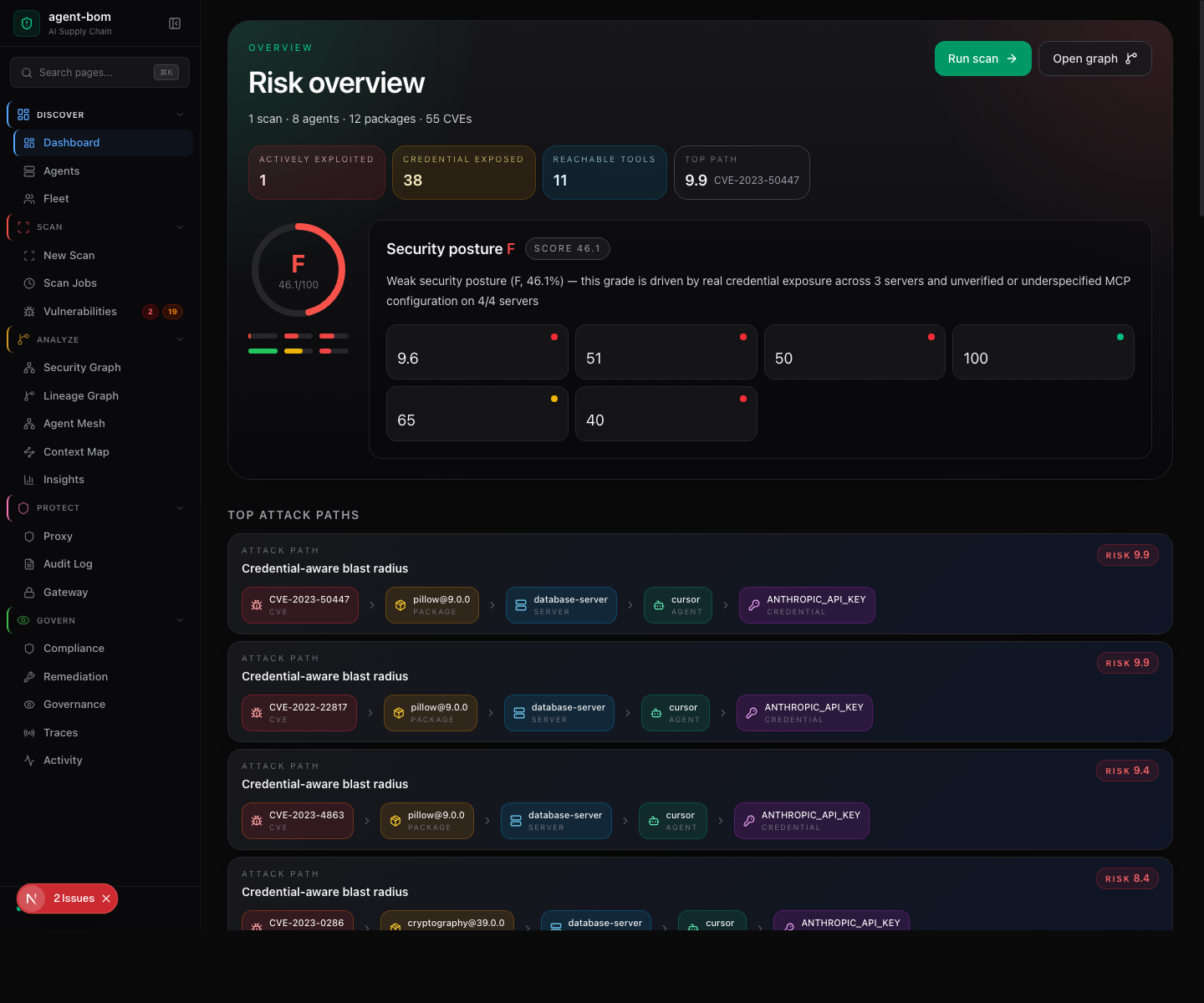
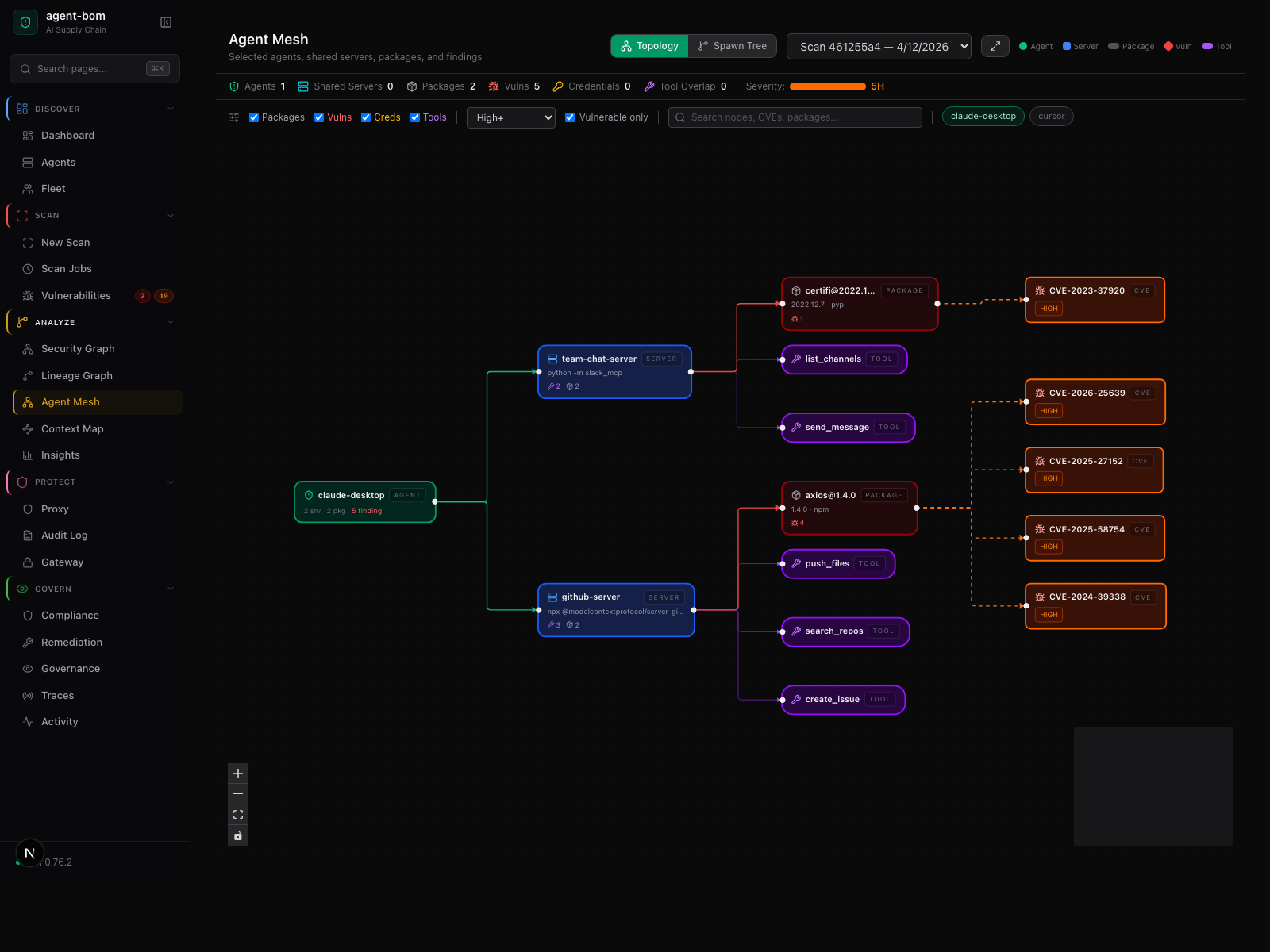
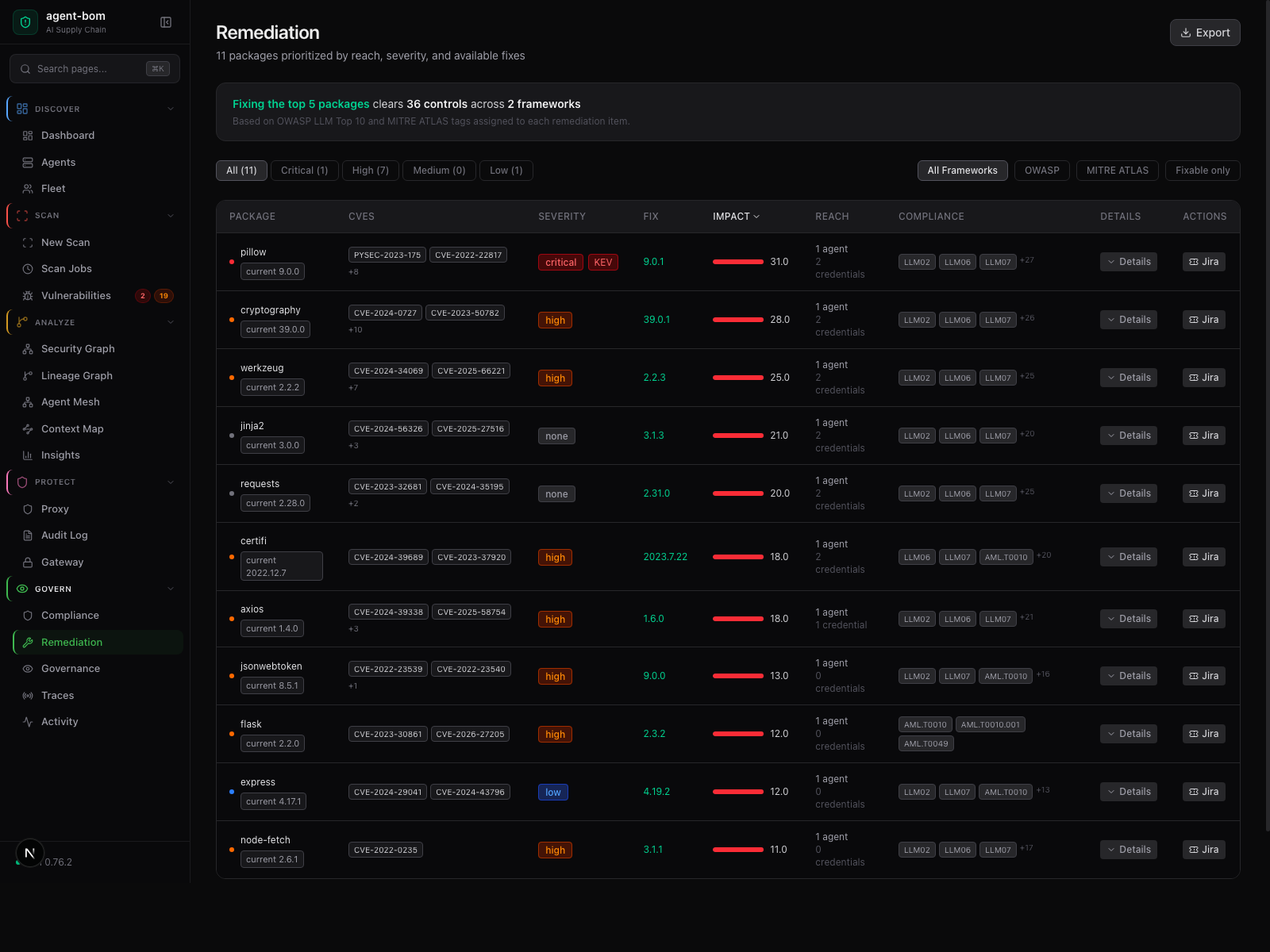
What Operators See After Deploy
The deployment story should end in usable operator surfaces, not just pods and YAML.
Risk overview
Focused fleet and graph visibility
Remediation workflow
Where to go next
The chooser table at the top of this page is the canonical entry. After that:
- runtime surface decision lives in When To Use Proxy vs Gateway vs Fleet
- backend choice (Postgres / ClickHouse / Snowflake) is documented in Backend Parity Matrix and Backend and Security-Lake Strategy
- the deeper data-model and store mapping is in Control-Plane Data Model and Store Parity
- the API + UI control-plane image and operator split is in Packaged API + UI Control Plane and Self-Hosted Product Architecture
Everything else in the deployment section is reference material — open it only when your platform team needs that specific detail.